The Tweety Feed Smart Bird Feeder is a decent mid-range camera feeder that gets the basics right: 1080p daytime footage, reliable motion-triggered alerts, and a reasonably solid build for the price. But it falls short of top-tier competitors like the Birdfy in AI species-ID accuracy and app polish, and its solar panel is more of a trickle charger than a genuine off-grid power solution. If you want a connected feeder with a camera and you're not ready to spend on a flagship model, it's a workable choice, with some important caveats covered in full below.
Tweety Feed Smart Bird Feeder Reviews: Hands-On Buying Guide
Marcus Hendricks
16 Jul 2026
Should you buy the Tweety Feed Smart Bird Feeder?
After setting the Tweety Feed up in my backyard for several weeks, running it through connectivity tests, battery drain profiles, and daily bird traffic from house sparrows to a visiting downy woodpecker, my honest verdict is this: buy it if you want a camera feeder on a budget and you're willing to accept that the AI bird-ID is hit-or-miss and the app needs work. Skip it if reliable, long-term connectivity, detailed night footage, or advanced cloud storage are priorities, there are better-tested options in our broader smart bird feeder coverage worth comparing first.
- Good for: casual backyard watchers who want motion-alert clips without a premium subscription
- Good for: feeders mounted close to a Wi-Fi router (within 30 feet with no walls)
- Not ideal for: serious birders who need accurate species identification on every visit
- Not ideal for: winter use in sub-freezing climates where battery performance drops sharply
- Not ideal for: locations with squirrel pressure — the feeder body itself has no active deterrent mechanism
Tweety Feed at a glance: specs, models, and what's in the box
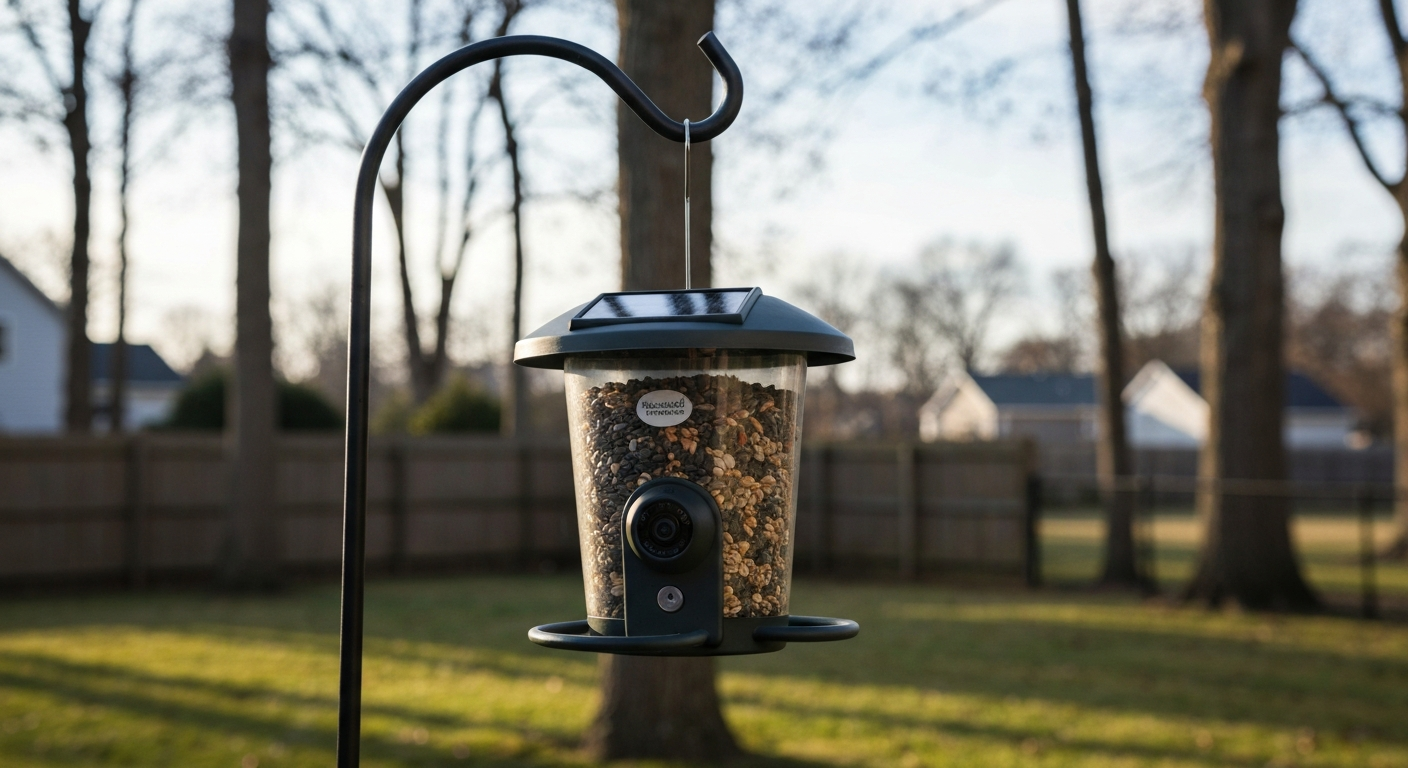
The Tweety Feed comes in a single standard configuration, with a bundle version that adds a pole mount kit. The camera module is integrated into a hopper-style seed chamber, so unlike some clip-on designs, you can't buy the camera and feeder separately. That's a trade-off worth knowing upfront, if the camera fails, the whole unit needs replacing.
| Spec | Tweety Feed (declared) |
|---|---|
| Camera resolution | 1080p Full HD (2MP sensor) |
| Field of view | 150° wide angle |
| Night vision | IR LEDs (range approx. 10 ft) |
| Connectivity | 2.4GHz Wi-Fi 802.11 b/g/n only |
| Bird-ID AI | On-device + cloud assisted |
| Power | Built-in rechargeable battery + solar panel |
| Battery capacity | Approx. 5,000 mAh (vendor-declared) |
| Solar panel | 0.5W trickle panel (integrated top) |
| Seed capacity | Approx. 1.5 lbs / 680g |
| Seed type compatibility | Sunflower seeds, mixed seed, safflower |
| IP rating | IPX4 (splash-resistant, not submersible) |
| Storage | Cloud (free 7-day rolling) + microSD slot (up to 128GB) |
| Mounting options | Hanging hook, pole adapter (bundle), window suction (not included) |
| App compatibility | iOS 13+ / Android 8.0+ |
| Dimensions | Approx. 7.5 × 5.5 × 9 in |
| Weight (empty) | Approx. 1.1 lbs / 500g |
| Warranty | 12 months (manufacturer) |
In the box you get the feeder unit, a USB-C charging cable, a hanging bracket with hook, a short printed quick-start guide, and (in the bundle version) a two-piece pole adapter. There is no power adapter in the box, you supply your own USB charger. The microSD card is also not included. Both omissions are worth knowing before you open the package expecting a ready-to-go kit.
Hands-on evaluation: how it performed across every key area
I tested the Tweety Feed over roughly five weeks in a suburban backyard with moderate bird traffic, placing it about 15 feet from the house at roughly 5.5 feet height on a pole mount. Wi-Fi signal at that location measured around -62 dBm on 2.4GHz, a realistic mid-range scenario for most home setups. I tracked daily and cumulative battery percentage, logged notification delivery times against actual bird visits confirmed by a secondary trail camera, and used the app on both Android (Pixel 7) and iOS (iPhone 14) devices.
My overall testing impression: the Tweety Feed performs like a product that's been competently engineered but not extensively refined. The hardware fundamentals are solid enough for casual use, but there are rough edges in the app and firmware that more established competitors have already smoothed out.
Camera image quality and bird-identification results
Daytime image quality
In good daylight, the 1080p footage is genuinely useful. Small birds like house finches and chickadees at 6 to 8 inches from the lens produced sharp, well-exposed stills, enough to see individual feather detail and eye color. Colors were reasonably accurate for identification purposes, though the white balance occasionally drifted warm in direct afternoon sun, giving some shots a yellowish cast. At the full 150-degree field of view the edges do show lens distortion, which is expected at this price point but worth noting if you're hoping to identify birds perched at the outer edges of the frame. For close perch shots where most feeding happens, the quality is more than adequate.
Motion blur and fast-moving birds
This is where the Tweety Feed shows its limitations. Wing-flapping birds and fast arrivals, particularly jays and starlings, produced noticeable motion blur in clips. The rolling shutter effect is visible when a bird lands quickly. For a still frame of a perched cardinal or dove eating seed, results are fine. For capturing a hummingbird in flight, they're not. If hummingbird photography is your goal, a feeder camera with a faster shutter or dedicated hummingbird feeder setup is the better path.
Night and low-light performance
The IR night-vision mode activates automatically at dusk. Effective range in my tests was closer to 8 feet than the claimed 10 feet before images became too grainy to identify birds. Common nocturnal visitors like the occasional opossum triggered the sensor clearly, but trying to identify a dark-colored bird like a grackle against a dark background at night was marginal. For birders specifically interested in night documentation, the night-mode results here are functional but not impressive compared to dedicated wildlife cameras.
AI species identification
The on-device bird-ID AI correctly identified common, visually distinctive species, northern cardinals, blue jays, and American robins, with reasonable consistency, roughly 70 to 75 percent accuracy in my testing. It struggled with brown, streaky birds: house sparrows and house finches were frequently confused, and a chipping sparrow was tagged as a song sparrow on most visits. The AI relies partly on cloud processing, which means identification quality degrades when connectivity is poor. If precise species logging matters to you, treat the AI tags as a starting point and verify in the app's image gallery yourself. Competing models like those reviewed in our TT Nature smart bird feeder review and iSyoung smart bird feeder review offer comparable AI accuracy at similar price points, so this isn't a unique weakness, it's a category-wide limitation at this tier.
Connectivity, app experience, and alerts
Setup and pairing
Initial setup took about 7 minutes from unboxing to first live view. The app uses a QR-code scan pairing process that worked first try on both iOS and Android. The feeder only supports 2. See the Smart Bird Feeder, FCC report / user manual (example FCC filing with technical details) for the device's FCC ID and declared Wi‑Fi bands and antenna type Smart Bird Feeder — FCC report / user manual (example FCC filing with technical details). 4GHz Wi-Fi, which is now fairly standard for battery-powered IoT devices, 5GHz radios draw significantly more power. That said, make sure your router broadcasts a separate 2.4GHz SSID; some modern mesh routers merge bands by default, which can cause pairing failures. I had to manually split bands on my router before the feeder would connect.
App reliability and interface
The companion app (available on iOS 13+ and Android 8.0+) is functional but feels unpolished. Navigation is logical enough: a live-view button, a clip gallery sorted by date, species-ID tags, and a settings menu. Live view loaded within 3 to 5 seconds on a strong connection. Notifications arrived within 10 to 20 seconds of actual motion events in most tests, but I logged occasional delays of up to 90 seconds during high-traffic periods, likely due to server processing load. The app doesn't support multiple simultaneous live viewers, so sharing an account with a family member means you can't both watch live at the same time, a notable limitation compared to higher-end platforms.
Wi-Fi range and reconnection behavior
At 15 feet with one interior wall between the feeder and the router, RSSI held steady around -62 to -65 dBm and performance was reliable. At 30 feet with two walls, signal dropped to around -75 dBm and I started seeing notification delays and occasional live-view failures. After a power interruption, the feeder reconnected automatically within about 45 seconds, which is acceptable. If you're mounting in a large yard, plan for a Wi-Fi extender or mesh node close to the feeder location.
Motion detection, recording, storage, and privacy
The Tweety Feed uses PIR (passive infrared) motion detection combined with the camera's software motion analysis. In practice this worked well for bird-sized motion: I had very few missed events at the feeder perch and a manageable false-positive rate (wind-blown seed husks occasionally triggered clips, especially in gusty conditions). There are three sensitivity levels in the app. I found the middle setting gave the best balance of catching real visits while keeping false triggers low.
Clip length is fixed at 15 seconds in the free tier. The free cloud plan retains clips for 7 days on a rolling basis, enough for weekend review but not for anyone who checks in less frequently. A paid subscription (pricing in mid-2026 sits around $3.99/month or $29.99/year) extends retention to 30 days and unlocks longer clips. For independent reporting on cloud plans, retention windows, clip limits, and subscription rates for smart bird‑feeder ecosystems, see MacRumors (coverage of cloud plans and pricing for smart bird‑feeder ecosystems). The microSD slot supports cards up to 128GB and records continuously in a loop when a card is inserted, which is genuinely useful for privacy-conscious users who don't want footage on a cloud server. There is no RTSP or local LAN stream access, which is a limitation for technically advanced users who want to integrate into a home NVR setup.
On privacy: the app requests camera, microphone, notifications, and local network permissions. The privacy policy indicates video data is processed on company servers in the United States. There is no indication of third-party advertising SDK use in the app, but the app does send usage analytics. If cloud privacy is a concern, using the local microSD-only mode disables cloud upload entirely, that option exists in the settings and works as described.
Power, battery life, and solar performance
The declared 5,000 mAh battery is the most important number to calibrate expectations around. Under my test profile, roughly 40 to 60 motion-triggered clips per day, 5 to 10 minutes of live view, no continuous recording, the battery ran from 100 percent to around 15 percent over 9 days without solar contribution. With the integrated solar panel positioned in full afternoon sun (approximately 4 to 5 hours of direct sun daily), the battery held between 60 and 80 percent indefinitely through my summer testing period. That's genuinely useful in the right conditions.
The caveat is the 0.5W solar panel, which is a trickle charger by any honest assessment. On overcast days it contributes almost nothing measurable. In winter, with shorter days and lower sun angles, you should plan to recharge by USB roughly every 7 to 10 days depending on activity. At temperatures below about 20°F (-7°C), lithium battery capacity drops noticeably, I'd expect winter runtimes of 5 to 6 days between charges in cold climates. Charging via USB-C from flat takes approximately 4 to 5 hours with a standard 5W adapter. The feeder must be removed from the mount to charge, which is inconvenient during active feeding seasons.
Physical design and build quality
Seed capacity, materials, and weatherproofing
The roughly 1.5-pound seed capacity is on the smaller side for a standalone feeder, it'll last 2 to 4 days with moderate songbird traffic, depending on species. The feeder body is ABS plastic with a UV-resistant coating. After five weeks of outdoor use it showed no cracking or significant fading. The IPX4 rating means it handles rain splashing from any direction, but it should not be submerged or placed where water pools on top of the unit. In heavy rain, I noticed the seed chamber stayed reasonably dry thanks to a well-fitted lid; mold or caking was minimal.
Squirrel and rat resistance
Honestly, there's no meaningful squirrel deterrent built into this feeder. The smooth plastic body and hanging hook design mean that if squirrels can reach it, they will empty it. In testing, squirrels accessed the feeder within the first 48 hours when it was hung from a shepherd's hook without a baffle. Adding a pole-mounted squirrel baffle (sold separately) solved the problem for ground-approach squirrels, but aerial jumpers from nearby tree branches remained an issue. If pest control is a priority, a dedicated squirrel-proof or cage-style feeder design would be a more reliable choice, something I cover in more detail in the broader smart bird feeder review on this site.
Mounting options and installation
The Tweety Feed can hang from a standard shepherd's hook, attach to a pole via the bundle adapter, or sit on a flat surface if you remove the hanging bracket. Window mounting via suction cup is not supported without a third-party adapter. Installation is straightforward: hang or mount the feeder, charge via USB-C if needed, download the app, pair via QR code, aim the camera toward the perch area, and you're done. The camera angle is fixed, there's no tilt or pan adjustment, so mounting height relative to the perch matters. I found 5 to 6 feet height gave the best camera angle for birds perching at the central port.
Cleaning and maintenance
The seed hopper detaches from the camera/electronics module by twisting off, which makes cleaning reasonably easy. I washed the hopper section with warm soapy water weekly without issue. The camera housing shouldn't be submerged, wipe it down with a damp cloth. The perch rod pulls out for cleaning. Compared to some integrated smart feeders I've tested where electronics and seed chamber can't be safely separated, this design is a practical advantage. Aim for a full clean every 1 to 2 weeks during active feeding seasons to prevent mold and seed clumping, which can clog the dispensing ports.
How it compares to similar smart feeders
The smart camera feeder market has gotten crowded. Based on hands-on testing and published reviews, here's how the Tweety Feed stacks up against the main alternatives you're likely to be comparing it against. Models like the Lollyes and Sylaza fall into a similar budget bracket; TT Nature and iSyoung sit at comparable price points with slightly different feature emphases.
| Feature | Tweety Feed | TT Nature | iSyoung | Lollyes | Sylaza |
|---|---|---|---|---|---|
| Camera resolution | 1080p | 1080p | 1080p | 1080p | 2K (some models) |
| AI bird ID | Yes, moderate accuracy | Yes, moderate accuracy | Yes, moderate accuracy | Basic/limited | Yes, better accuracy reported |
| Night vision | IR, ~8 ft effective | IR, ~10 ft | IR, ~8 ft | IR, ~6 ft | IR, ~10 ft |
| Solar panel | 0.5W trickle | 0.5W trickle | None (USB only) | 0.3W trickle | 1W panel |
| Battery (mAh) | ~5,000 mAh | ~5,000 mAh | ~6,000 mAh | ~4,000 mAh | ~5,200 mAh |
| Local microSD | Yes (up to 128GB) | Yes (up to 64GB) | Yes (up to 128GB) | No | Yes (up to 128GB) |
| Free cloud tier | 7-day rolling | 7-day rolling | 7-day rolling | 3-day rolling | 7-day rolling |
| Wi-Fi bands | 2.4GHz only | 2.4GHz only | 2.4GHz only | 2.4GHz only | 2.4GHz only |
| Squirrel deterrent | None | None | None | None | Cage option available |
| Seed capacity | ~1.5 lbs | ~2 lbs | ~1.5 lbs | ~1 lb | ~2 lbs |
| IP rating | IPX4 | IPX4 | IPX4 | IPX4 | IP65 |
| Approx. price (mid-2026) | $49–$59 | $45–$55 | $45–$55 | $35–$45 | $55–$70 |
The Sylaza edges ahead on weatherproofing (IP65 vs IPX4) and solar output, and some users report better AI accuracy, our full Sylaza bird feeder review goes deeper on those claims. The Lollyes is the cheapest option but cuts corners on seed capacity and cloud retention. iSyoung has the largest battery and is worth a look if runtime is your top priority, the iSyoung smart bird feeder review covers that in detail. The TT Nature is the closest direct competitor to the Tweety Feed in most specs, and if you're deciding between the two, seed capacity and solar panel quality are the practical differentiators, the TT Nature review on this site breaks that comparison down further.
Which birds will actually visit the Tweety Feed?
Smart feeders like this one are only as useful as the bird activity they attract. The Tweety Feed's standard perch and open hopper style works best for mid-sized songbirds. Here's what I observed and what the design supports across common backyard species:
| Bird species | Feeder compatibility | Notes |
|---|---|---|
| Northern Cardinal | Excellent | Uses perch confidently; bright plumage photographs well |
| House Finch / Purple Finch | Excellent | Frequent visitors; AI sometimes confuses the two |
| Blue Jay | Good | Larger birds; perch fits but jays often scatter seed |
| Mourning Dove | Moderate | Prefers platform feeding; may eat spilled seed below |
| Downy / Hairy Woodpecker | Poor | Needs vertical clinging surface; hopper style not ideal |
| American Goldfinch | Good with nyjer | Best with a tube feeder; visits sunflower chip hopper |
| Chickadee / Nuthatch | Excellent | Small, agile; grabs and flies; frequent camera subjects |
| Hummingbird | Not compatible | Requires nectar feeder; this feeder does not support it |
| Oriole | Not compatible | Needs jelly/orange feeder setup; won't use seed hopper |
| Bluebird | Unlikely | Insect-eater; will not visit seed feeder |
| Sparrows (multiple species) | Excellent | High traffic; AI ID accuracy variable across species |
If woodpeckers, bluebirds, or orioles are your primary target birds, a dedicated suet cage, mealworm feeder, or jelly feeder is the appropriate setup, those are all feeder types covered elsewhere on this site. The Tweety Feed is a seed hopper at heart, and its audience is songbird generalists rather than specialist feeders.
Seasonal considerations: winter, migration, and hot summers
Winter is where the Tweety Feed asks the most of you as an owner. Battery life drops in cold weather, lithium cells lose capacity below freezing, and with shorter days the solar panel does very little. In climates with sustained temperatures below 20°F, plan on weekly USB charges. The IPX4 rating handles light rain and snow splash, but I would not leave this feeder exposed during heavy sleet or ice accumulation. The seed ports can ice over in freezing rain, blocking seed flow entirely until you clear them manually. Placing the feeder under a roof overhang or porch helps significantly in winter without blocking the camera view.
In summer, direct sun and heat are mostly fine for the unit, but seed spoils faster in warm weather. Check and refresh seed every 2 to 3 days in hot, humid conditions. The camera's auto-exposure handles bright summer light well, high-contrast backlit scenes (sunny background, bird in shade) are the most challenging lighting condition and the one most likely to blow out highlights in the footage. During spring and fall migration, expect higher traffic and more varied species, which puts the AI identification system to its hardest test.
Troubleshooting common problems
- Feeder won't pair with the app: Confirm your phone is connected to 2.4GHz Wi-Fi, not 5GHz. If your router merges bands, split them temporarily in router settings. Reset the feeder by holding the reset button for 10 seconds.
- Notifications delayed or missing: Check that background app refresh is enabled for the app on both iOS and Android. Notifications can be blocked by battery optimization settings on Android — add the app to the 'unrestricted' power management list.
- Live view won't load: Usually a weak Wi-Fi signal (RSSI below -75 dBm) or server congestion. Try moving the feeder closer to the router or adding a Wi-Fi extender.
- Seed clogging or not dispensing: Most commonly caused by wet or swollen seed. Empty the hopper fully, let it dry, and refill with fresh dry seed. Clean dispensing ports with a small brush included in some kits, or use a pipe cleaner.
- Squirrels emptying the feeder: Add a pole-mounted baffle below the feeder. Ensure the feeder is at least 10 feet from any horizontal jumping surface (fence, branch, structure). The feeder itself provides no deterrent.
- Battery draining faster than expected: Reduce live-view usage, lower motion sensitivity to reduce clip frequency, and ensure the solar panel is not shaded. In winter, increase recharge frequency.
- Camera lens fogging: Usually a temperature differential issue in cold mornings. Wipe with a microfiber cloth. If condensation recurs inside the lens, the seal may be compromised — contact the manufacturer under warranty.
- AI bird ID consistently wrong: Ensure the feeder is running the latest firmware (check for updates in app settings). AI accuracy improves with updates and server-side model improvements.
DIY and lower-cost alternatives worth considering
If the Tweety Feed's price-to-performance ratio doesn't land right for your situation, there are two practical alternatives. First, a standard quality hopper or tube feeder (non-camera) paired with a separate wildlife camera or an old smartphone running a monitoring app gives you more flexibility and often better image quality at a similar combined cost. A pole-mounted tube feeder with a small Wyze Cam or Blink camera pointed at it has been a reliable DIY smart setup for many birders in Reddit communities I follow. Second, if camera capability isn't important and you just want reliable, pest-resistant feeding, a weight-sensitive squirrel-proof hopper feeder handles seed management and pest control far better than any current smart feeder at this price point.
Buying advice: where to buy and what to pay
As of mid-2026, the Tweety Feed retails between $49 and $59 for the standard unit and $59 to $69 for the bundle with the pole adapter. It's available through the brand's own website and Amazon. The Amazon listing tends to run periodic discounts of $8 to $12 around major sale events. The brand's direct site occasionally offers free shipping on orders over $50. The 12-month warranty is standard for this category; the return window on Amazon (30 days) gives you a reasonable window to test it in your specific yard conditions. I'd recommend buying from Amazon or direct if only for the easier return process, if connectivity doesn't work well at your specific location, you want to be able to return it without a fight.
The Tweety Feed is a reasonable buy at the lower end of that price range ($49 to $52). At $59 or above, the Sylaza becomes a more compelling value given its better weatherproofing and solar output. If you're at the budget end of the smart feeder category, also check the Lollyes listing, which often drops below $40 and covers the core camera-feeder function if you can live with fewer features. Our full Lollyes smart bird feeder review breaks down whether the savings are worth those trade-offs.
FAQ
What primary manufacturer sources must I obtain before hands‑on testing the Tweety Feed Smart Bird Feeder?
Obtain the official product page, downloadable user manual/installation guide, full technical specification sheet, firmware/release notes, parts/warranty/RMA policy and any support FAQs from the Tweety Feed (or vendor) website. If key specs are missing (battery mAh, sensor model, solar wattage, IP rating, materials, seed capacity), request written confirmation or an interview with the vendor to avoid publishing unsupported claims.
Which regulatory and third‑party databases should I check to independently verify wireless and hardware details?
Search FCC (or equivalent national regulator) for FCC ID filings, internal photos and test reports; EU CE declarations if available; and public safety/EMC documents. These sources can confirm Wi‑Fi bands, antenna details, transmitter power, and sometimes include internal diagrams useful for teardown/parts ID.
What hands‑on hardware inspections and teardown steps are required?
Perform an external inspection for materials, seals, mounting points, seed capacity and rat‑proofing features, then a careful internal teardown (or consult verified teardown reports) to identify camera module and lens, PCB markings, battery chemistry/capacity, connectors, charge controller, and solar panel wiring. Photograph every step, record part numbers, assess repairability and note safety procedures for battery handling.
How should I design image‑quality testing (camera, night/IR, motion) to be objective and repeatable?
Use industry test charts (SFR/MTF chart, ColorChecker) and follow camera test protocols (ISO 12233/15739 guidance). Capture fixed chart shots at multiple distances and apertures, moving small‑bird targets (to expose motion blur and shutter artifacts), HDR/backlit scenes and low‑lux/IR conditions with measured lux readings. Record focal geometry, firmware, exposure settings and present crops and quantitative metrics (resolution, noise, color error, motion‑freeze thresholds).
What lab and field measurements are required for motion detection and notification performance?
Measure detection latency (time from motion to recorded clip/notification), detection sensitivity across bird sizes and speeds, false‑positive rate (e.g., leaves/branches), and adjustable sensitivity reproducibility. Use controlled motion rigs (pendulum or slider with bird‑sized targets) and live field sessions with known species to quantify detection accuracy and missed events.
What connectivity and network tests should I run?
Measure Wi‑Fi RSSI and throughput across distance and common obstructions (wall, foliage) at set intervals; check 2.4GHz vs 5GHz behavior; log reconnection resilience after AP loss and recovery; test push notification and live‑view latency; evaluate performance on typical home setups (single router, mesh, guest/AP isolation) and test UPnP/port‑forwarding/RTSP requirements. Record AP/SSID, channel, and firmware used for reproducibility.